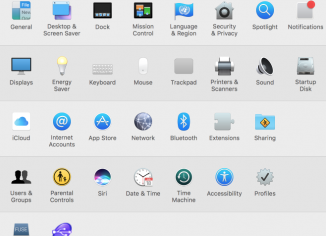
I recently noticed the problem in Safari browser which was hijacked by SearchPage.com virus. The option to change the home page in Safari was simply not available. Here is what you should do: Quit Safari. Access System Preferences in Mac. Click on “Profiles“: Remove suspicious profiles related to Safari: Restart Safari and change the home page back to google.com.
-
-
Many users, especially those who own MAC OS X PCs, are currently getting multiple popups from the page that starts with http://dlvr.readserver.net. The full link path is much longer, we will not quote it for safety reasons, of course. This particular problem (occurrence of pop-ups from dlvr.readserver.net) happens each time users click on a text box in any web page user opens. Some users find it difficult to get rid of such annoying popups coming up all the time, especially considering the fact that this problem takes place not in Windows operating system but rather in MAC OSX. In this…
-
If you see mysearch.avg.com whenever you open each new search tab of our browser this means that your browser settings have been amended. Some security blogs today believe that mysearch.avg.com is a browser hijacker. Since the domain avg.com is related to a well-known and reputable company called AVG, we don’t think it is correct to speak of mysearch.avg.com as a browser hijacker. Even through the very amendment of search settings indeed takes place automatically in some cases, causing mysearch.avg.com to appear as the start page of your browser. This problem surely might occur with all browsers, but especially with Google…
-
This article explains how to convert all caps letters into lowercase using Microsoft Word. Sometimes you have certain text with all letters capitalized. Let us suppose you need to shift all letters into lowercase, or to make only first letters of each word as capital and the rest ones as small. Surely, it is a nonsense to re-type all words all over again to suit your preferences! Why don’t you use the function that is available for all versions of Microsoft Word?
-
You probably enjoy your new licensed Windows 8 successfully installed! Well, now let us dig into some details of this new opearting system. In certain cases you may need to have the ability to view hidden files and folders on your computer. By default, the system settings of Windows 8 hide this data from user’s attention for security reasons. How can you actually see your hidden files and folders then? Please follow the steps outlined below.