
Ads by Coupoon. Effective removal


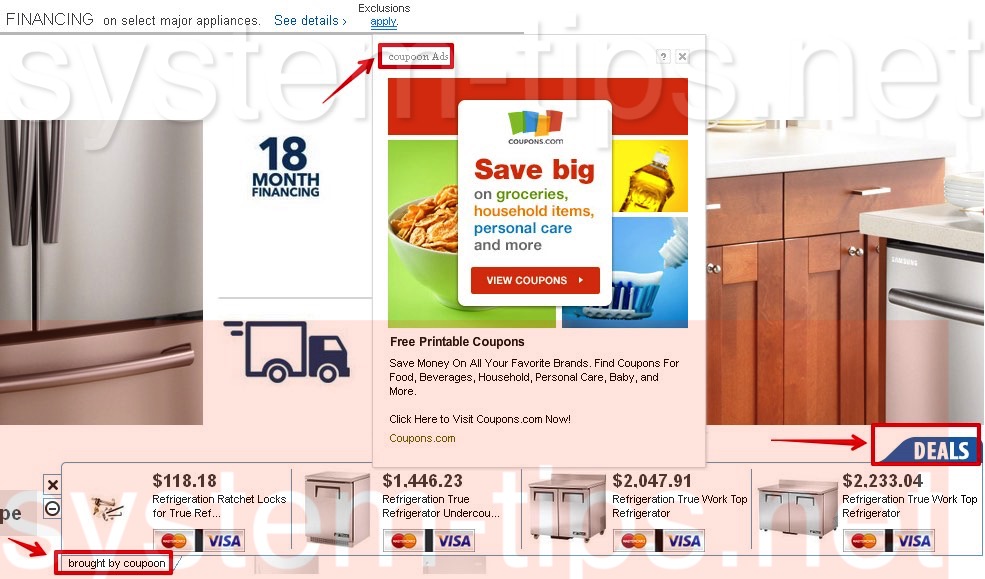
Coupoon is a new adware currently invading all major browsers. This application acts in a very intrusive manner. It is definitely able to make a real mess out of your computer. Whenever you go online, you will discover a lot of ads brought by Coupoon to come out of the blue. Most likely such ads become visible whenever users visit various e-commerce websites.
Coupoon adware removal menu:
- Recommended software to remove adware automatically.
- Resetting browser settings after automatic removal of adware.
- Video explaining how to reset your browsers affected by adware.
- Tutorial to remove adware manually.
- How to prevent your PC from being reinfected.
Coupoon adware pursues the only goal, which is to bring profit to the companies that distribute it in the Internet. The more installs of this program are performed, the more income is obtained by its proprietors. Likewise, the more clicks on its ads are carried out successfully, the more profit goes into the pockets of those who spread it in the Internet.
Coupoon Ads generally don’t represent any valuable information before you. There are cases when its ads and deals are relevant to what you’ve been looking for online recently. In many cases these ads will be very misleading and may cause all kinds of unwanted redirections of your browser to various third-party websites. These websites, in their turn, could prompt you into downloading and installing various useless and even hazardous applications into your computer.
The adware is able to convert the regular words of a visited website into links. So, when you move the computer mouse towards some of these words, Coupoon Ads will arise. Also, you may see various advertisement banners to be displayed on the top and in the bottom of the commercial websites you go to.
Please do not think that Coupoon adware is a good program to keep in your computer. Remember what we told you about its real plots. It has in mind to make its owners and distributors richer, but surely it will not help you to save more funds from your online shopping.
We definitely recommend you to get rid of this nasty adware by scanning your system with GridinSoft Trojan Killer, which is a reliable antispyware application. You will need to remove all the infections it finds (with its registered version), and to reset your browsers with its help. All these important steps are listed below.
Software to get rid of Coupoon automatically.

Important milestones to delete Coupoon automatically are as follows:
- Downloading and installing the program.
- Scanning of your PC with it.
- Removal of all infections detected by it (with full registered version).
- Resetting your browser with GridinSoft Trojan Killer.
- Restarting your computer.
Detailed instructions to remove Coupoon automatically.
- Download GridinSoft Trojan Killer through the download button above.
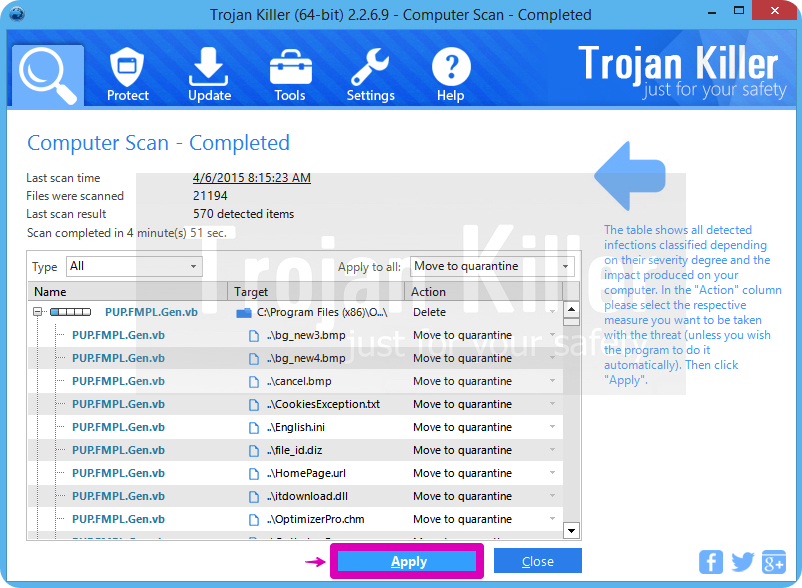
- Install the program and scan your computer with it.
- At the end of scan click “Apply” to remove all infections associated with Coupoon:
- Important! It is also necessary that you reset your browsers with GridinSoft Trojan Killer after this particular adware removal. Shut down all your available browsers now.
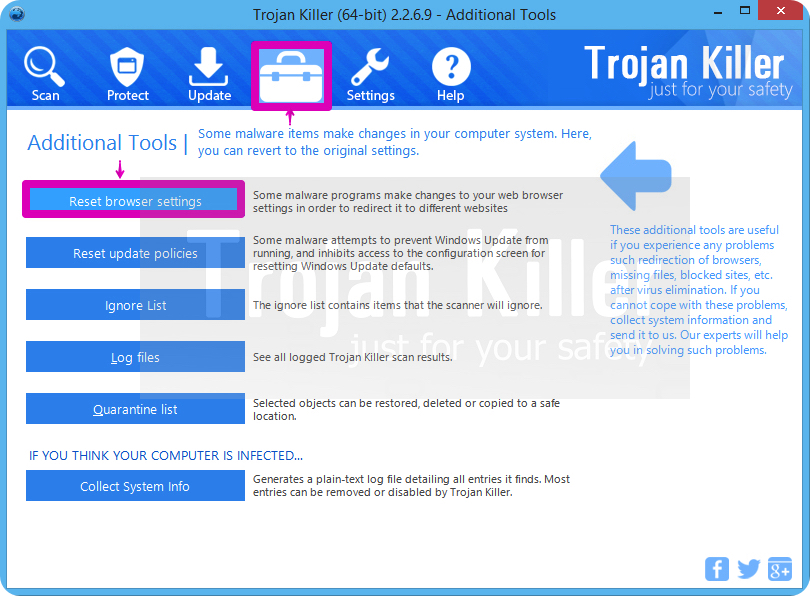
- In GridinSoft Trojan Killer click on “Tools” tab and select “Reset browser settings“:
- Select which particular browsers you want to be reset and choose the reset options.
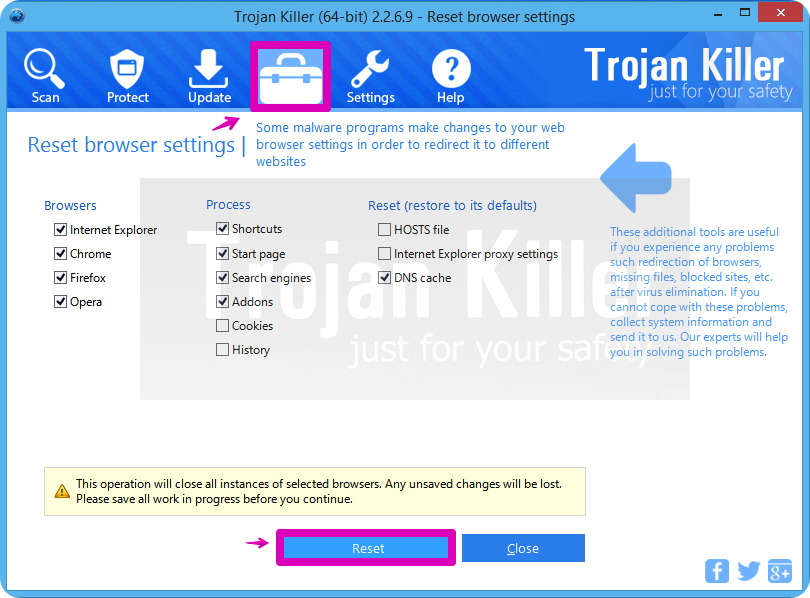
- Click on “Reset” button.
- You will receive the confirmation windows about browser settings reset successfully.
- Reboot your PC now.
Video guide explaining how to reset browsers altogether automatically with GridinSoft Trojan Killer:
Detailed removal instructions to uninstall Coupoon manually
Step 1. Uninstalling this adware from the Control Panel of your computer.
- Make sure that all your browsers infected with Coupoon adware are shut down (closed).
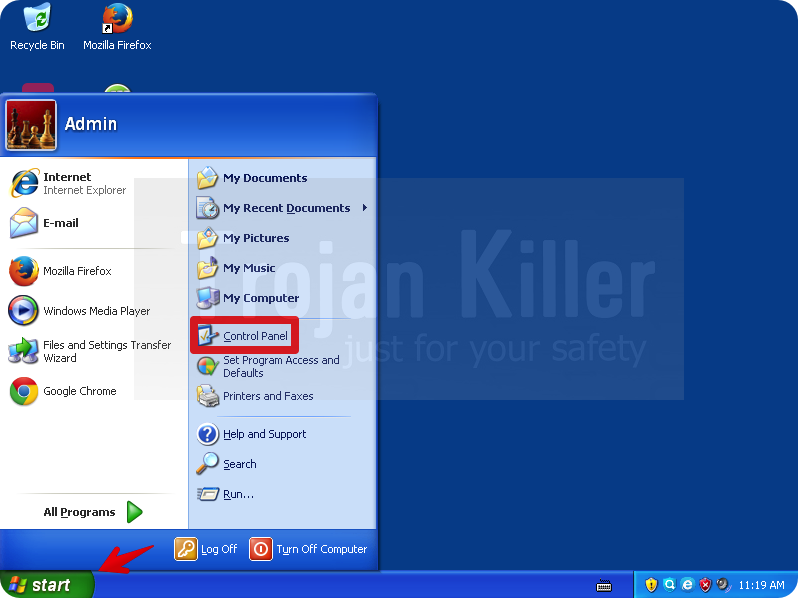
- Click on “Start” and go to the “Control Panel“:
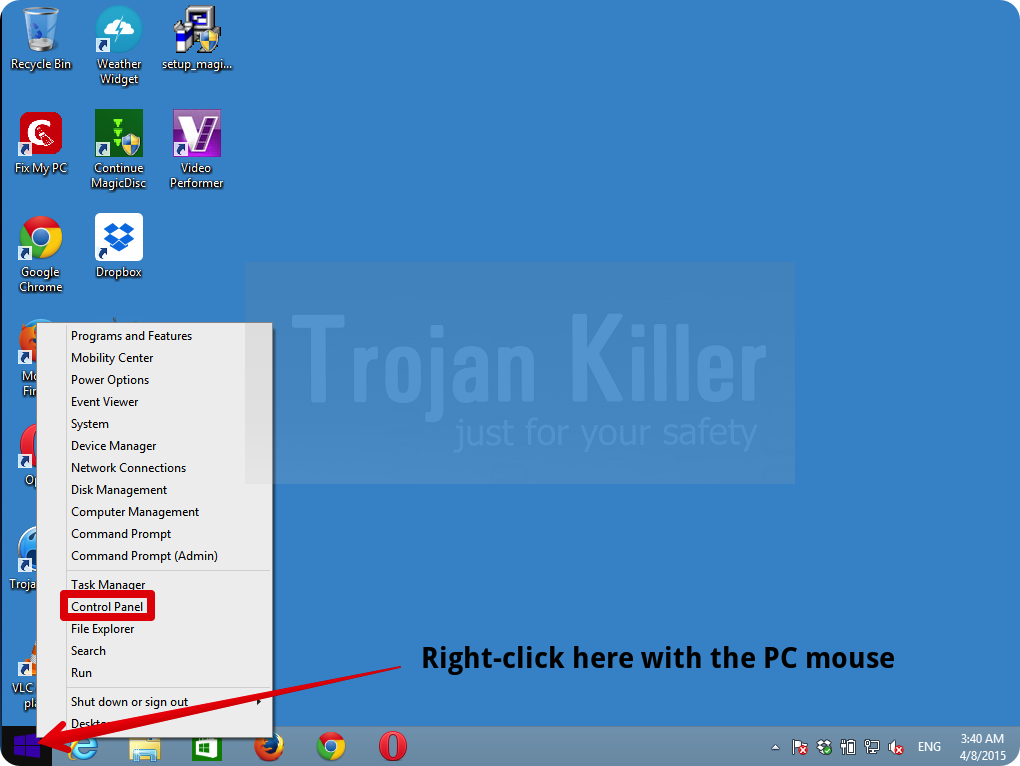
- To access the Control Panel in Windows 8 operating system move the computer mouse towards the left bottom hot corner of Windows 8 screen and right-click on it. In Windows 8.1, simply right-click on the “Start” button. Then click on “Control Panel“:
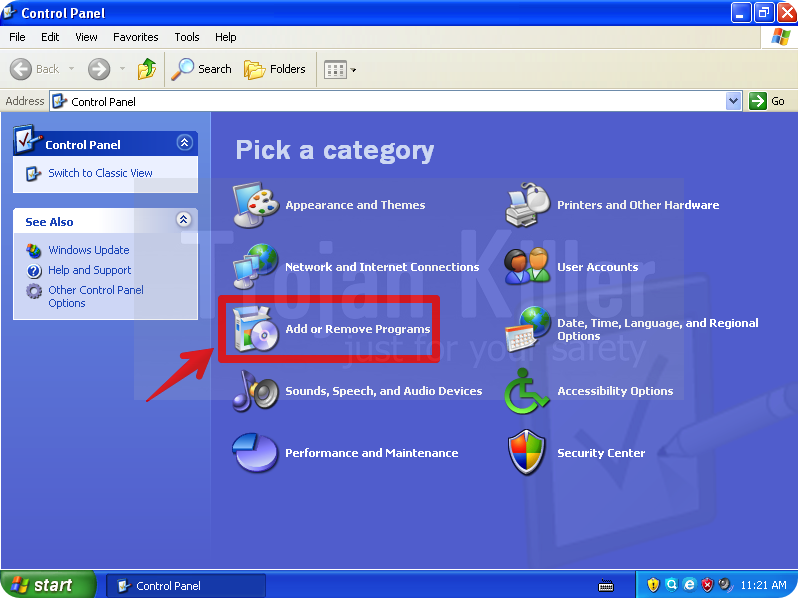
- In Windows XP click on “Add or remove programs“:
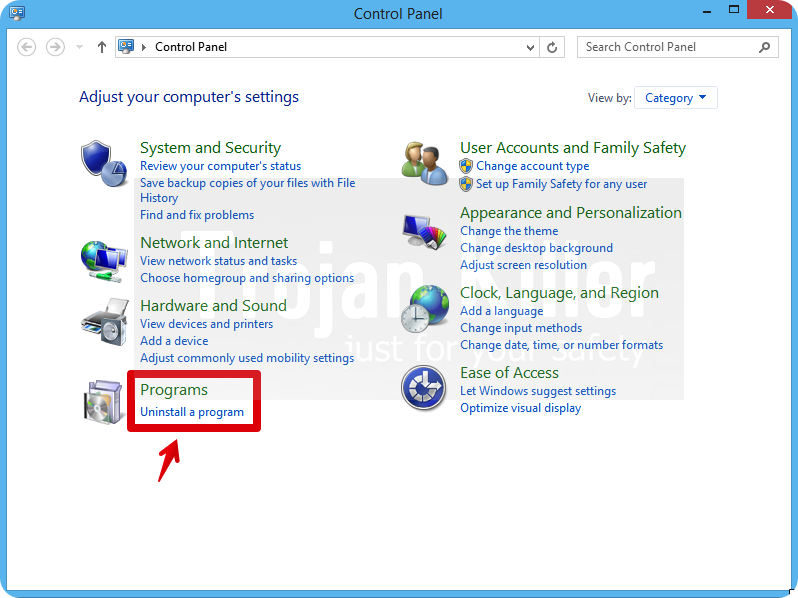
- In Windows Vista, 7, 8 and 8.1 click on “Uninstall a program“:
- Uninstall Coupoon adware. To do it, in Windows XP click “Remove” button related to it. In Windows Vista, 7, 8 and 8.1 right-click on this adware with the PC mouse and click on “Uninstall / Change“.
Step 2. Removing adware from the list of add-ons and extensions of your browser.
In addition to removal of adware from the Control Panel of your PC as explained above, you also need to remove this adware from the add-ons or extensions of your browser. Please follow this guide for managing browser add-ons and extensions for more detailed information. Remove any items related to this adware and other unwanted applications installed on your PC.
How to prevent your PC from being reinfected:
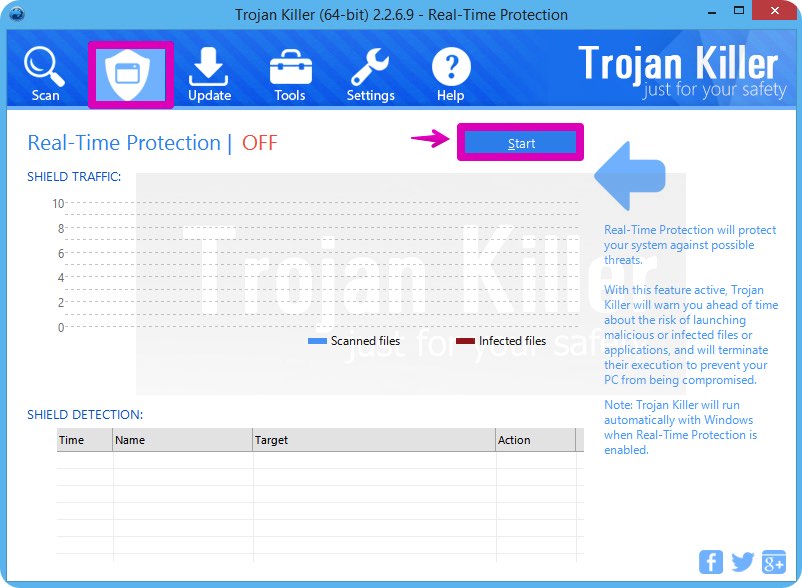
GridinSoft Trojan Killer offers a superb service to prevent malicious programs from being launched in your PC ahead of time. By default, this option is disabled once you install Trojan Killer. To enable the Real-Time Protection mode click on the “Protect” button and hit “Start” as explained below:
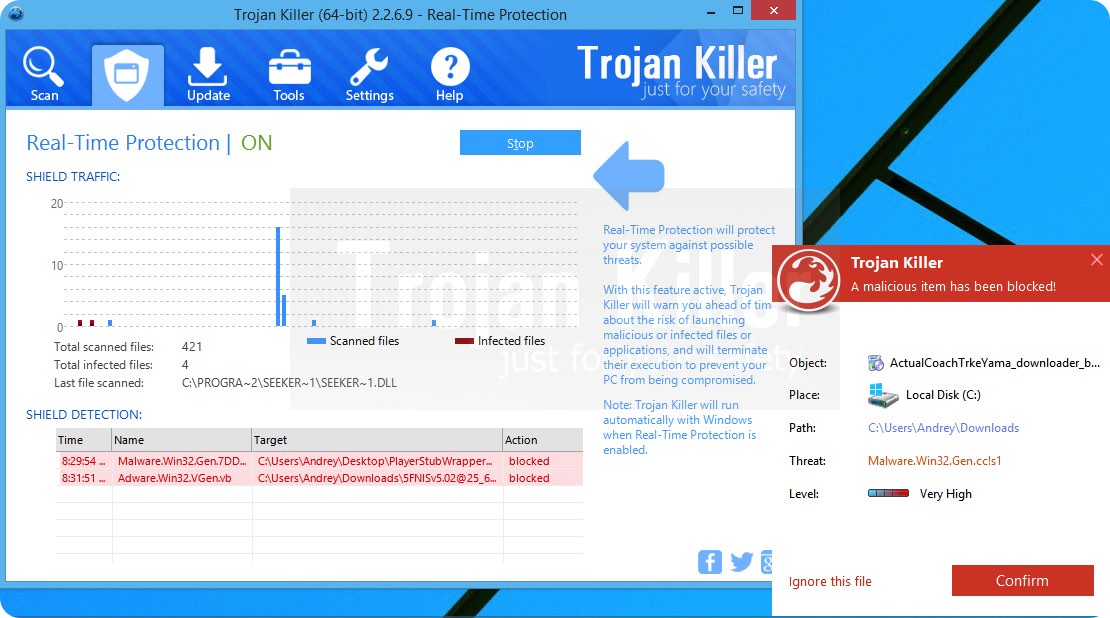
Once this option is enabled, your computer will be protected against all possible malware attacking your PC and attempting to execute (install) itself. You may click on the “Confirm” button to continue blocking this infected file from being executed, or you may ignore this warning and launch this file.
Categories: