• Security

    Systembrowsing.com scam. Beware of the frauds!

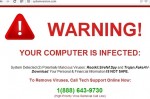
    Systembrowsing.com is another malicious website used for hijacking your browser. This problem is caused by the activity of virus makers who want to get easy cash through deceiving and tricking users. This infection is thus able to hijack your browser with a fake warning, telling you to call fake tech support. This is the example of scary alert as seen in the browser hijacked by systembrowsing.com scam:

  • Security

    Adobeupdate2014.com – fake Flash Player Update alert

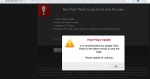
    There’s a danger associated with fake Flash Player Update warnng from site adobeupdate2014.com. Clicking this pop-up window in your browser is very risky because it may considerably infect your computer with a lot of potentially unwanted programs (PUPs), such as adware, browser hijackers, useless extensions, add-ons, and even more serious malwares. This is why the site adobeupdate2014.com is dangerous and must be avoided by all means.

  • General System Tips - Security

    Remove pop ups from http://dlvr.readserver.net in MAC OS X

    Many users, especially those who own MAC OS X PCs, are currently getting multiple popups from the page that starts with http://dlvr.readserver.net. The full link path is much longer, we will not quote it for safety reasons, of course. This particular problem (occurrence of pop-ups from dlvr.readserver.net) happens each time users click on a text box in any web page user opens. Some users find it difficult to get rid of such annoying popups coming up all the time, especially considering the fact that this problem takes place not in Windows operating system but rather in MAC OSX. In this…

  • Security

    “Warning! Critical update” fake alert removal

    Warning! Critical update is a fake alert which you may receive in your browser while visiting some sites. This is the method how hackers online prompt users into downloading rogue security software. The program hijacks your browser and imitates the attempt to update some software installed on your computer. You might encounter an alert about a supposed update available for browsers like Internet Explorer, Google Chrome or Mozilla Firefox. Or, quite possible, this fake update will mention the necessity to update your entire operating system. The alert tells that your system is in danger and that you need to install…